A different kind of talk
I recently had the opportunity to speak at my kid’s class about AI.
It was not a conference talk. There were no slides about model architectures or leadership frameworks. There were 12 year olds, lots of opinions, and very little patience for fluff.
Which, in hindsight, was perfect.
TL;DR:
You can find:
Feel free to reuse or adapt them.
What we did not talk about
We did not talk about:
- org charts
- management theories
- the future of work
Instead, we focused on one simple idea.
AI will always give you an answer. Humans decide whether the answer makes sense.
Prompt → Validate → Refine
The core workflow we used throughout the session was:
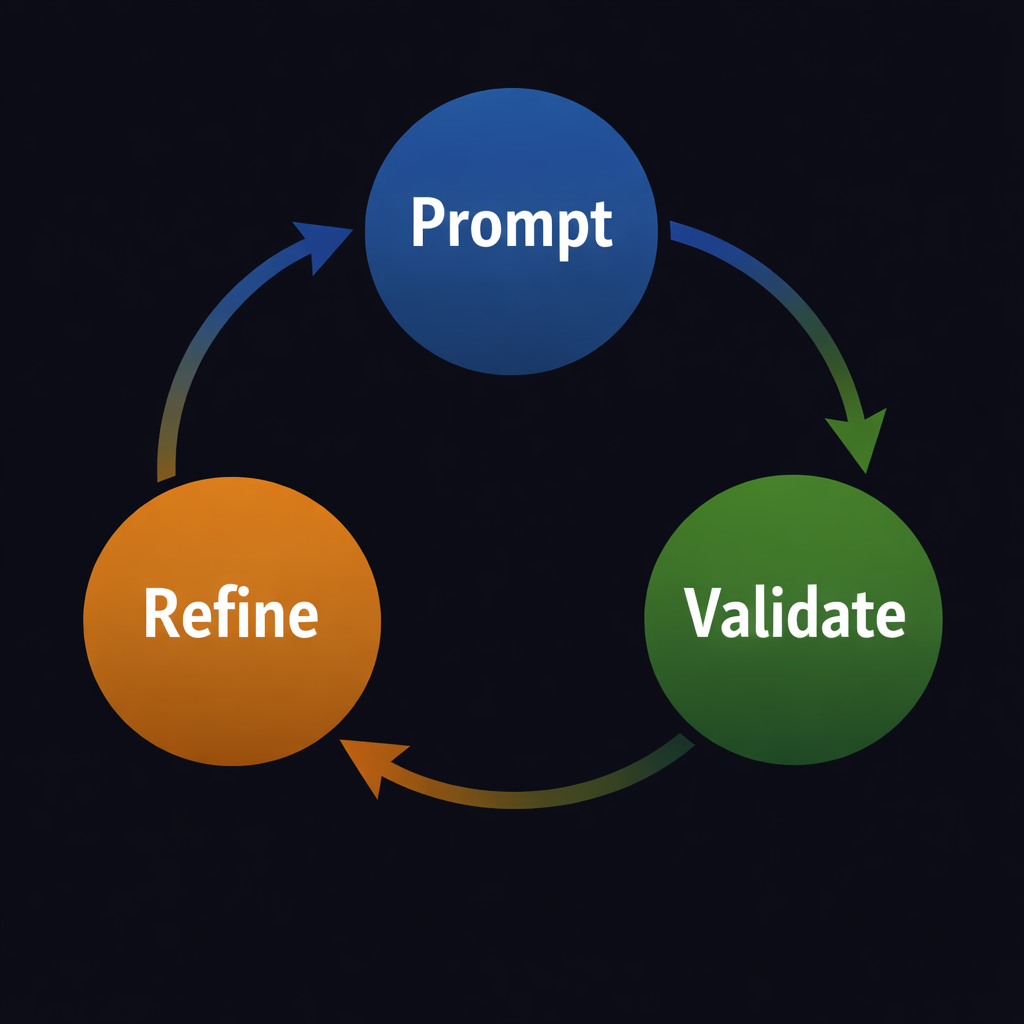
We used it to:
- generate images
- improve results
- catch mistakes
- understand why “almost right” is often still wrong
This loop turned out to be incredibly intuitive, even for kids.
Making it work for kids
Was surprisingly not much work, besides adding MEMEs like this:

How the app came to life
The workshop did not start in the classroom. It started at home, with a vague idea and a lot of curiosity.
I wanted something tangible. Something visual. Something that would make AI feel less abstract and more inspectable.
So I decided to build a tiny image generation app.
Not because the app itself mattered, but because the process would.
Phase 1: Getting a skeleton with ChatGPT
The first step was simple.
I asked ChatGPT to help me bootstrap a very small Node.js app:
- a basic Express server
- a minimal HTML page
- a single endpoint that calls an image generation API
Nothing fancy. Just enough to work.
At this stage, the goal was speed, not quality. ChatGPT was great at this.
It gave me:
- a working skeleton
- reasonable defaults
- something I could run locally within minutes
This was a good example of where AI shines. Turning a blank page into a starting point.
Phase 2: Iterating in the terminal with Claude
Once the skeleton existed, the real work began.
From that point on, most of the iteration happened directly in the terminal, using Claude as a coding partner. This included:
- improving structure
- splitting files properly
- adding styling
- handling loading states
- improving logging
- thinking about safety and constraints
This phase was slower, but much more deliberate.
Instead of asking for a full app, I asked for:
- small changes
- focused improvements
- explanations when something felt unclear
This is where Prompt → Validate → Refine really started to show up in practice.
The actual prompts used to build the app
-
I’d like to add a loading indicator when the image request button is clicked
-
Can we make sure we don’t have any single line if statements? AKA add curly braces (server and HTML)
-
I’d like to make this a bit more styled, like a chat box in the middle of the screen with a drop shadow effect. Could we also add an animation on the chat box when Generate is clicked, maybe showing “Thinking”?
-
Looks great. Could we make the chat box a bit larger, about two thirds of the screen height and width, with a reasonable ratio?
-
Could you add a toggle for a dark theme and make dark the default?
-
Is there a way to change the banned check by defining it as a prompt or context to the images.generate call? I’d prefer not to explicitly check banned words.
-
Can we replace violence, weapons, blood, or gore checks with something like “make it fitting for 12 year old children”? Also, please split the CSS and JavaScript out of index.html.
-
Could you add some logging around the image generation API to be a bit more verbose?
-
Is there a way to save the context from the chat so the next prompt can use it?
-
Make the scroll bar look natural with no white border and ensure the chat scrolls to the bottom after each image. Also change the title to “Nachshon AI Lab FTW”.
Phase 3: Bringing it to the classroom
Before we started to hack on the actual app, I talked a bit about AI, more specifically about hallucinations.
Spot the Hallucination (Penguin Edition)
One of the highlights of the session was a mini game we called Spot the Hallucination.
The idea was simple.
AI will answer confidently whether it knows the topic or not.
But confidence does not mean correctness.
So we asked the AI to give us facts about penguins and the kids had to decide if they were real or hallucinations.
Penguin Facts (AI says…)
-
Penguins can’t fly, but they can swim faster than most humans.
-
Penguins use their wings like flippers and “fly” underwater.
-
Some penguins build nests in trees so their eggs won’t get cold feet.
-
Penguins remember which humans forgot to feed them.
-
Penguins slide on their bellies across the ice because it’s faster (and more fun).
Actual answers
✔️ 1 — Real
✔️ 2 — Real
❌ 3 — Hallucination (penguins do not build nests in trees)
❌ 4 — Hallucination (no evidence penguins identify humans by memory in that way)
✔️ 5 — Real (they “toboggan” on ice)
AI answers questions, but it does not know if the answer is true.
The 4th question was actually really good for explaining how AI tend to humanize animals.
Getting hands on in the classroom
By the time I walked into the classroom, the app already worked.
But that was not the point.
We did not start by talking about code. We started by generating images.
The kids suggested prompts. We looked at the results. We talked about what worked and what did not.
Very quickly, questions came up:
- Why did the AI generate this?
- Why did it misunderstand that?
- What should we change in the prompt?
That naturally led us to talk about limits.
Prompt limits and responsibility
One of the most important discussions we had was about constraints.
Not technical constraints. Human ones.
We talked about what it means to make something:
- fitting for 12 year old children
- appropriate for a classroom
- safe even when someone tries to be clever
Instead of hardcoding long lists of banned words, we discussed intent. What are we trying to allow? What are we trying to avoid?
This turned into a great example of how:
- rules are rarely perfect
- context matters
- humans are still responsible for the outcomes
The prompts behind the app
At some point, the conversation shifted from “what can AI generate?” to “what should it generate?”
That question did not come from a lecture. It came naturally, once the kids realized that AI will happily try to do whatever you ask.
Instead of hardcoding long lists of forbidden words, I wanted to show something more interesting. That rules can be expressed as intent. That we can ask AI to help us enforce boundaries, not just produce output.
So we added two prompts that quietly shaped the entire experience.
Prompt 1: Moderation as intent, not a blacklist
|
|
What I liked about this approach is that it mirrors real leadership decisions.
We are not trying to predict every bad outcome. We are defining what “appropriate” means and taking responsibility for enforcing it.
Prompt 2: Context and continuity
|
|
Phase 4: Letting the kids drive
At a certain point, I stopped suggesting changes.
The kids took over.
They asked for:
- bigger UI elements
- colors
- animations
- glittering titles
Some of the ideas were impractical. Some were hilarious. Some were surprisingly thoughtful.
All of them were valuable.
Because each request became another chance to practice: Prompt. Validate. Refine.
During the lecture (after generating hilarious images), the kids themselves added the following prompts to Claude, which we immediately refreshed and validated and of course, refined.
-
Can you make the chat box way bigger?
-
Can you make the title baby pink and glittering?
This one was especially good, since it changed the text and not the background, which wasn’t what the kids initially meant, became a classic exercise of prompt, validate and refine!
-
Can you change the background of the title to pink and make the text a visible hue?
The kids thought about the fact that the text wouldn’t be visible if both the background and the text are pink, and added the explicit ask to make the text visible!
-
Can you make the background around the chat change color each time we write something?
This one was perfect for explaining events, something we used Scratch (which the kids are learning) to explain the differences between logical statements, loops and events
Filling the gaps while AI was “thinking”
Every time we clicked Generate, there was a pause. A few seconds where the AI was thinking.
Instead of rushing through it, we used that time. The kids, and me as well, filled it with dad jokes.
Bad ones. Terrible ones. The kind that make you groan before you laugh.
In retrospect, it felt oddly fitting.
AI was doing what it does best, generating. Humans were doing what we do best, connecting.
What we didn’t have time for
I showed them a small Lovable app, with two buttons, one for showing a random science fact, the other for a random dad pun, wanted to show them that not all code is generated in a terminal (although it should, TUI FTW!).
In addition, I didn’t really have time to go into the leadership slides, the teacher did let me emphasis the last slide which the kids really got:
- AI is a tool
- Leadership is human
- The future belongs to people who:
- Ask good questions
- Validate answers
- Refine their thinking
Just like we did with the image generator.
A final thought
The kids did not treat AI as magic. They treated it as something to play with, test, and question.
They laughed when it was wrong. They refined when it misunderstood. They did not take confidence at face value.
Also, they have very strong opinions about glittering pink titles.
Their potential in pure dad pun energy was limitless!
If this is how they approach technology, I am not worried at all.